Showing posts with label Computer. Show all posts

05 August 2009

DEEPFREEZE 6.30


Dtyo-tech Faronics Deep Freeze helps eliminate workstation damage and downtime by making computer configurations indestructible. Once Deep Freeze is installed on a workstation, any changes made to the computer—regardless of whether they are accidental or malicious—are never permanent. Deep Freeze provides immediate immunity from many of the problems that plague computers today—inevitable configuration drift, accidental system misconfiguration, malicious software activity, and incidental system degradation.

Deep Freeze ensures computers are absolutely bulletproof, even when users have full access to system software and settings. Users get to enjoy a pristine and unrestricted computing experience, while IT personnel are freed from tedious helpdesk requests, constant system maintenance, and continuous configuration drift. You can download Deepfreeze from link above

DOWNLOAD

18 June 2009

EASEUS Partition Master Home Edition 4.0.1


Dtyo-tech A handy partition software for hard disk that will help you create or delete a partition
EASEUS Partition Master is a comprehensive partition software, which not only provides with convenient user-interface simplifying your tasks but also enables you to configure and manage partitions of hard drive.
With its help, you can extend system partition, have better disk space management, settle low disk space problem! The most attractive feature is it can resize/move partition without destroying data. This free partition software works perfectly with hardware RAID and Windows 2000/XP/Vista Operating Systems.

It not only provides convenient user-interface to simplify your job but also enables you to configure and manage partitions of hard drive. Safely copy dynamic volume to basic disk with resizing this basic disk and extend NTFS system partition without reboot are available now. In addition, Disk & Partition copy is designed for protecting your data.

Here is a main function list about EASEUS Partition Master can perform:

· Resize/ Move partitions
· Create partitions
· Delete/ (delete all) partitions
· Label partitions
· Format partitions
· View Disk/Partition property
· Set Active
· Hide/Unhide partitions

Here are some key features of "EASEUS Partition Master Home Edition":
· Support hardware RAID.
· Resize and move partitions without losing data.
· Create, delete and format partitions with simple step.
· Label partitions - assigned to a partition for easier recognition.
· View Disk/Partition property of each partition.
· Hide and unhide partitions - protect important data from unauthorized or casual access.
· Set an active partition - specify one partition to be the boot partition.
· Preview the effects of partitioning a hard drive before implementing anything.
· Change cluster size automatically and manually.
· Support hard disks from 20GB to 800GB.
· User-friendly interface.

DOWNLOAD

22 May 2009

TuneUp Utilities 8.0.3100.31 2009 Portable

TuneUp Utilities 2009 can make your Windows operating system faster, more comfortable and more secure with just a few mouse clicks. And all operations performed on the operating system are completely safe, because all changes are monitored by TuneUp Rescue Center and can be undone at any time. All TuneUp Utilities modules can be accessed through a common interface that is divided into six categories.


The software helps both beginners and experts to make Windows meet their needs in a way that is better, easier and safer. All important system options are explained in an easy way and can be turned on or off at the click of your mouse. TuneUp Utilities 2009 will then make the necessary changes in the registry or boot files automatically. We place a high value on system stability, so that Windows won't stop working reliably. And most changes that you make can be undone in TuneUp Rescue Center - easily and safely.

The program also gives you many more options. In addition to helping you make Windows "better looking", you can also clean up and optimize your system at the click of a mouse. TuneUp Utilities 2009 will clean up unnecessary data from your hard disk and remove unnecessary entries from your registry. It can defragment your hard disk and registry and optimize your system settings to make Windows run substantially faster. Most of this maintenance is performed automatically every week by TuneUp 1-Click Maintenance.

Fast, Effective Windows Optimization
??? One-click overview of your PC performance
??? Quick analysis of your PC??™s hardware, operating system, and programs
??? Real performance increases, real fast
??? Easy-to-understand help functions

Intelligent Windows Optimization Built in for Every PC
??? Intelligent recommendations for your unique PC optimization
??? Identifies your personal settings and protects them
??? Highlights your PC??™s optimization potential, including unused programs and resource-draining settings
??? Recommends options and explains performance results before taking any action

Safe Windows Optimization
??? Provides you with safe and effective optimization results
??? Corrects all mistakes created from previous tuning attempts
??? Comprehensive and easy rollback ability for any changes made to your PC

Perfectly Designed for Your Windows Operating System
??? Automatically detects and configures for your operating system
??? Ideal for XP and Vista (32/64 bit) users
??? Designed to leverage the unique features within each operating system

Highlights of TuneUp Utilities 2009:
TuneUp Start page: Intuitive Layout, Easy to Use
* Provides quick and easy access to the most critical optimization functions
* A single yet comprehensive appraisal of your PC??™s current performance and overall system health
TuneUp Speed Optimizer: Intelligent, Powerful Utility for any User Skill Level
* Easy optimization in just a few clicks
* Identifies unused programs and resource-draining functions
* Recommends tools for optimal PC performance
TuneUp 1-Click Maintenance: Automatic, Fast Optimization
* Enables one-click maintenance of the most important functions of your PC
* Cleans the Windows registry
* Deletes temporary files and folders
* Increases the system performance through integrated defragmentation
* Streamlines your desktop and simplifies folder shortcuts with one click

Improved Features of TuneUp Utilities 2009:
* TuneUp Drive Defrag: Intelligent defragmentation with new progress display
* TuneUp System Control: Supports Opera
* TuneUp Uninstall Manager: Intuitive uninstall options
* TuneUp Startup Manager: Increases the speed at the start-up of your PC
* TuneUp Styler: Expanded PC style options for Windows Vista (32/64 Bit)
* TuneUp Registry Cleaner: More powerful tool with in-depth view of your PC registry

Download Here

17 May 2009

KaKa Folder Protector 5.39

KaKa Folder Protector is a file-security program allowing the user to hide, lock, encrypt and protect files and folders in the blink of an eye. When folders are password protected and locked, their contents cannot be read, copied, modified or deleted. To access the locked folders, you must supply the correct password.


KaKa Folder Protector has advanced features such as "Security-Level", allowing the user to select the Strength. Other features of Folder Protector include: Security Level, Show Protected Signs, Password Hint, Change icon of the protected folder, File Filter system.

Folders can also be protected on portable devices like USB flash disk and removable hard disk. KaKa Folder Protector can also be used on Windows Vista/2003/XP/2000/NT/ME/98.

Features:
* Three Methods: Lock,Scramble and Encrypt Folder. Depending on the security level you need.
* On the Fly Protection: Using the Strong protection technology that can effectively lock/encrypt all your files.
* Strong Encryption: A strong industry standard 256-bit BLOWFISH Encryption is used to encrypt your files.
* Portability: Folders can be protected on portable devices like USB flash disk and removable hard disk.
* Drive Firewall: Allows you to protect your data from virus and other bad software.
* Security: Protected files are totally hidden and locked, undeletable, unmovable and totally inaccessible.

DOWNLOAD

13 May 2009

Advanced Vista Optimizer 2009 3.5


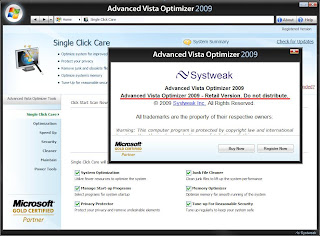
No.1 System utility to optimize Windows Vista/XP . Systweak Inc. has combined a host of utilities in Advanced Vista Optimizer 2009 to maintain your system in superfine health. The user interface has been given Windows Vista style. It provides summary of the system in use on its right. The button, Show Details, takes you to system information menu to provide the required details. The left portion displays the various option of the selected button.

Advanced Vista Optimizer, a comprehensive suite of utilities, works on Windows Vista and XP. Advanced Vista Optimizer helps in Boosting up your PC’s performance with its powerful optimizing features that are efficient and easy to use. It consists of more than 40+ tools for various purposes. It optimizes the overall performance of the system with special emphasis on File Fetching capability, Startup, Memory, Virtual Memory, CPU, Desktop, Windows and file system. It looks up hard disk, CD & DVD, Mouse, Keyboard as well as USB devices. It also checks and defrags registry and hard disk.

Advanced Vista Optimizer provides statistical information about every aspect of the system to help you go to the root problem if required. It optimizes the overall performance of the system. It also checks and defrags registry and hard disk. The customization of start menu, control panel, taskbar, desktop, internet explorer, media player, logon/off, visual settings can be done as per your choice. The programs not in use or required can be un-installed.

The system has been made more secured by looking specifically into the areas of Windows update, firewall, defender and user account settings. The facilities of file shredder and encryption/decryption have also been utilized. The suspected programs can be selected exclusively to prevent their running. Privacy factor has been considered also. Duplicate, junk files can be securely removed. The programs not in use or required can be un-installed.

Single Click Care - This module of Advanced Vista Optimizer is designed for all users to make the most out of their Windows Vista PC without any effort. It includes important tools to optimize system, startup programs, protect your privacy, clean junk files, optimize memory and tuneup your computer for reasonable security.
• System Optimization. Checks your system for 13 attributes and recommends settings and optimizations
• Managing Start-up Programs. This part of Single Click Care in Advanced Vista Optimizer helps you optimize the auto start programs in the your Windows Vista Computer.
• Privacy Protector. Cleans the system for Privacy Protection like Internet history or other activities on the computer like the recently accessed programs.
• Junk File Cleaner. Scan your system for unused junk files and present you the list for cleaning. Removing junk files can greatly improve your system's response time.
• Memory Optimizer. Frees up unused Memory and optimizes Memory utilization so that you don't have to buy new hardware everytime!
• Tune-Up for Reasonable Security. Provides you with reasonable settings for securing your operating system and computer data.

Optimizers - There are various tools to optimize your Windows Vista computer. Advanced Vista Optimizer offers the following tools to you to optimize your Vista PC.
• Performance Tweaks for Windows Vista. This section of Advanced Vista Optimizer has five subsections, where you can perform overall Windows Vista Optimization for better speed and faster response.
• Hardware Tweaks. Offers you settings for your Hard Drive, CD/DVD, Mouse, Keyboard and USB drives.
• Memory Optimizer. Helps your Windows Vista PC by managing Memory of the system and freeing up RAM as and when it becomes available.
• Startup Manager. Provides you a list of the software which start automatically with your Windows Vista and also gives a brief description. You can choose which programs to allow and which programs to block from this list.

Power Tools - Systweak Inc. has combined a host of utilities in Power Tools section of Advanced Vista Optimizer 2009 to maintain your system in best of health.
• Systweak Photo Studio. Systweak Photo Studio is an easy to use image editing solution complete with various tools, filters and special effects to create, edit or modify digital images to give them the perfect finish. It can also be used to create photo albums from your existing set of images of your loved ones. With an intuitive interface, it has all the tools that you may require to create, edit or modify your digital images professionally.
• Advanced Email Backup. Advanced Email Backup is an easy and automated email backup solution which helps in preserving your personal emails and other data. You can schedule an automatic backup of your emails and various other settings so that you can restore them in the unfortunate event of a system failure. This means that you never lose your Emails, Contacts, Address Book and other important settings. You can relax as you will never again face any problem even in the case of data corruption, accidental deletion, virus, system failure or system crash. Advanced Email Backup will take care of you!
• Customize Visual Settings. Get the power of customization! Change the way your system looks and behaves. Customize Desktop Items, styles, tweaks, Desktop Windows Manager and Color & Appearance and give an all new image to your PC. Not only can you choose colors and intensity to give your system the aero glass effect, you can also change the appearence and settings of the Start menu, Control Panel items, Task Bar, Desktop items and their properties.
• Customize Program Settings. Will take care of you! Modify the settings and properties of your web broswer, configure the various options of media player and enhance your systems performance by changing the logon options. You can even change the locations of the default Windows folders on your PC among other settings.

Security Tools - Advanced Vista Optimizer can give you details of security settings in your Windows Vista computer and help you fix any leaks in the security of your system to protect data loss or theft.
• System Security. This section helps you take care of your overall System Security, by giving you the tweaks for Windows Update, Firewall, the all new Windows User Account Control and Windows Defender. This lets you change the settings for these to prevent data theft.
• File Security. Advanced Vista Optimizer lets you encrypt any file on your computer which you can access, so that others can not access it. It is specially useful for the files which you want to keep private and confidential. It helps you protect your valuable information like financial documents. It also includes a Magic Folder, where you can change the folder's appearance to make it look like a System Folder, to avoid unnecessary access.
• Secure Delete. Advanced Vista Optimizer helps you shred files on your Windows Vista computer, so that they are not recoverable. These files are permanently deleted from your Windows Vista PC and noone can recover them even if they have physical access to the disk. This is very useful when you want to discard a disk or when you keep important data on your system, which you want to remove.
• Block Programs. There are certain programs which you do not want to execute. These programs may be uninstallable but you may not want to uninstall them either. On certain computers, user may want to block access to Internet Browser so that no one can access the Internet. Advanced Vista Optimizer allows you to block access to the programs that you do not want to execute. You can also unblock them at any time in future.

Cleaners - improves the performance of the system by scanning and deleting temporary and junk files from the selected drives. It also takes care to clear the left over program fragments during their installation and un-installation processes.
• Junk File Cleaner. There are files on your system which may be empty, or may not be of any use anymore like the files creation at the time of installation of certain software. Advanced Vista Optimizer will scan your system for such files and present you the list for cleaning. Removing junk files can greatly improve your system's response time.
• Privacy Protector. Your Windows Vista computer may have traces of your Internet history or other activities on the computer like the recently accessed programs, media files played or recent files accessed etc. This may give away your personal information in case of unauthorized access. Advanced Vista Optimizer cleans the system for Privacy Protection.
• Duplicate File Finder. Duplicate files have same name, size and contents. This module searches them from the selected drives. You can add or remove any folder.

Maintenance Tools - Utilities have been provided here for Windows Vista especially but they are as much effective on other operating systems also.
• Windows Vista Utilities. These utilities take specific care of certificates, computer management, devices, performance, default applications, backup and restore operations. Security tools manage users & groups, security settings, firewall, and domain operations. Various Utilities looks after tools such as automatic update, system configuration and other system utilities. File Systems deal with registry, services, disk management and DirectX diagnostic tools.
• Uninstaller. Installing and uninstalling of program is not new to anybody. But the user may experience a problem when he wants to uninstall a program and the same is not found in Add/Remove Programs dialog. With this utility, you can now easily find all the programs and utilities installed on your computer, and can comfortably uninstall any application which is not required. Open this utility to view all the programs in your system being displayed. This view can be refreshed. Select the program whose details are displayed below. Click the button, Un-Install to remove it. Refresh the view to see that the uninstalled application is removed.
• Split and Join Files. Sometimes you may require a file to move to some other folder and get the job done there but it may be a very large in size. It may get damaged in transportation. This utility solves the problem by making chunks of the respective file. Then it joins them at the destination.
• Mass File Renamer. Many a times we find the essentiality of renaming all the files in a folder, so that the naming is synchronized altogether. For ex: If you have images in a folder of a celebration and you want it to rename all the files with the name of the occasion, it is tedious to rename them manually, in such cases this feature is of great help to you. Just give the name of your choice for the occasion and choose the necessary options per your liking, and you are done!

Speed Up Tools - Tool to optimize various settings which may help you increase the speed of Windows Vista.
• System Speed. Advanced Vista Optimizer includes tools to optimize various settings like Prefetcher, Superfetcher, boot menu and startup attributes, which may help you increase the speed of Windows Vista. It may make the response time of your system lesser and improve the response time as well.
• Disk Defrag. Hard disk is the slowest part of the computer compared to CPU and memory. If the contents of the data file are changed, added or removed several times then it is not necessary that the whole data file is located at the same place where it was accessed for the first time. The newly added file fills up the empty space and if the file is a big one then it looks for space elsewhere for its remaining portion. That is how the disk gets defragmented. Therefore, the accession takes more time every time. Disk defragging collects all the fragments of the file to combine into one. All the empty space is removed to make the whole disk contiguous.
• Registry Defragger. You must keep system's registry optimized to get best performance. It checks and defrags the registry to keep your system smooth. Click the button, Defrag Registry to start defragging. It also lets you know about the timing of last defrag done.

DOWNLOAD

09 May 2009

PDF to WORD Converter


Tweak PDF Converter 2.0 | 10.28 MB
Convert your files from PDF to DOC or RTF format with almost 100% accuracy
Tweak PDF Converter is an application which can easily convert PDF to Word documents, which can be edited as required. All the formatting of the original file is retained after conversion.

Text, layout, images and tables are all kept intact. In fact, you can even extract relevant images like logos, banners etc. from the PDF file. The Word document you get after the PDF to Word conversion is a completely editable Word document. You also have the option of converting your PDF to the .rtf format.


DOWNLOAD

25 March 2009

Kaspersky keys 100% works


Kaspersky Internet Security 8 Key
Kaspersky Internet Security Key For 7 & 8
Kaspersky Internet Security 6 Key
Kaspersky Anti-Virus Key For 7 & 8

Kaspersky Anti-Virus 7 Keygen

This is a keygen for Kaspersky Anti-Virus 7. It generates Activation codes which remain valid for a period of 360 days from the date of first install.

NOTE:- To use this Keygen on Vista u need to RUN IT AS ADMINISTRATOR.

Kaspersky Trial Resetter

This is the tool with which u can be assured that ur Kaspersky edition will not stop working just because of absence of working keys. This will provide u with Life-long edition of Kaspersky. This small tool will reset ur Kaspersky trial period n restore it to 30-days. So this means that just resetting the trial period 12 times, will get ur Kaspersky working for an year. The best part is that it is Legal.

Kaspersky 7 Patch

This patch ensures that your key never gets blacklisted & you get unlimited updates on all days.


Kaspersky Key Checker

Now this is one of the most amazing tools regarding Kaspersky, that I have come across.
It is a Key Checker.

What do you think it will do ?

Yup !! you guessed it right. You can check whether the key is blacklisted or not without taking the trouble of deleting the existing key & installing the new one. Isn't it cool ??

WARNING:- Kaspersky detects this to be a Malware. But I assure you it is not a Malware. It does so because it promotes the spread of non-blacklist Kaspersky keys. So I would say its completely safe to keep this tool and ask you to download it only
if you trust me. If you download it, then ADD IT TO TRUSTED ZONE otherwise Kaspersky will keep detecting it to be a malware.

DOWNLOAD

21 March 2009

McAfee Total Protection 2009


McAfee® Total Protection™ is hassle-free, all-you-need security ideal for people who are constantly online for communication, shopping, banking, trading or viewing entertainment. It features the award-winning McAfee SiteAdvisor® Plus web security tool that warns about and blocks risky web sites. McAfee Total Protection protects your family and entire network of PCs from viruses, spyware, hackers, identity thieves, and online scammers.

Don't leech from kopona.net It also offers parental controls. McAfee® Total Protection™ is now available with revolutionary Active Protection technology, providing immediate protection against malicious threats to your PC. A new threat can be analyzed and blocked in milliseconds, rather than waiting hours for traditional techniques. Active Protection is the best technology to keep you safe from emerging online threats.

With unmatched performance, McAfee® Total Protection™ runs silently in the background without slowing down your PC, boasting faster start-up, shut-down and scan times. McAfee’s security products use award-winning technology, are easy to install, and come with unlimited email and chat assistance. With continuous and automatic updates, McAfee ensures that you’re running the most current security to combat the ever-evolving threats on the Internet for the duration of your subscription. Don't leech from kopona.net. An Internet connection is required to install this software and to receive automatic updates and upgrades to keep your security up to date. You may install this product on up to 3 computers in your home.

Features:
- Anti-virus
- Anti-spyware
- Anti-spam
- Anti-phishing
- Two-way Firewall
- Advanced Web Site Safety Ratings
- Identity Protection
- Parental Controls
- Data Backup

Download:

DOWNLOAD

Oxford Dictionary 11 with sound - Portable


Description

This major new edition of the world-famous Concise Oxford English Dictionary provides an authoritative description of the English language. With instant access to over 240,000 words, phrases, and definitions, this program is ideal for anyone needing an up-to-date dictionary of current English on their PC for study, work, or home.
Cross-referencing, backtracking, cutting and pasting sections into your word processing document are just a few of the features you will find in this world-renowned best-selling dictionary. Containing meanings from street slang to scientific technology, this electronic dictionary will speed up your access to the English language.
Link:

DOWNLOAD

/

Viewer

Readers

Followers

DTYO - Tech © 2008. Template by Dicas Blogger.

TOPO