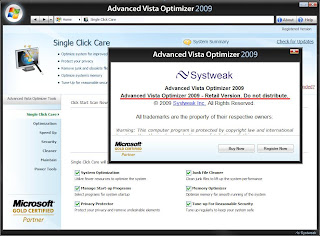
No.1 System utility to optimize Windows Vista/XP . Systweak Inc. has combined a host of utilities in Advanced Vista Optimizer 2009 to maintain your system in superfine health. The user interface has been given Windows Vista style. It provides summary of the system in use on its right. The button, Show Details, takes you to system information menu to provide the required details. The left portion displays the various option of the selected button.
Advanced Vista Optimizer, a comprehensive suite of utilities, works on Windows Vista and XP. Advanced Vista Optimizer helps in Boosting up your PC’s performance with its powerful optimizing features that are efficient and easy to use. It consists of more than 40+ tools for various purposes. It optimizes the overall performance of the system with special emphasis on File Fetching capability, Startup, Memory, Virtual Memory, CPU, Desktop, Windows and file system. It looks up hard disk, CD & DVD, Mouse, Keyboard as well as USB devices. It also checks and defrags registry and hard disk.
Advanced Vista Optimizer provides statistical information about every aspect of the system to help you go to the root problem if required. It optimizes the overall performance of the system. It also checks and defrags registry and hard disk. The customization of start menu, control panel, taskbar, desktop, internet explorer, media player, logon/off, visual settings can be done as per your choice. The programs not in use or required can be un-installed.
The system has been made more secured by looking specifically into the areas of Windows update, firewall, defender and user account settings. The facilities of file shredder and encryption/decryption have also been utilized. The suspected programs can be selected exclusively to prevent their running. Privacy factor has been considered also. Duplicate, junk files can be securely removed. The programs not in use or required can be un-installed.
Single Click Care - This module of Advanced Vista Optimizer is designed for all users to make the most out of their Windows Vista PC without any effort. It includes important tools to optimize system, startup programs, protect your privacy, clean junk files, optimize memory and tuneup your computer for reasonable security.
• System Optimization. Checks your system for 13 attributes and recommends settings and optimizations
• Managing Start-up Programs. This part of Single Click Care in Advanced Vista Optimizer helps you optimize the auto start programs in the your Windows Vista Computer.
• Privacy Protector. Cleans the system for Privacy Protection like Internet history or other activities on the computer like the recently accessed programs.
• Junk File Cleaner. Scan your system for unused junk files and present you the list for cleaning. Removing junk files can greatly improve your system's response time.
• Memory Optimizer. Frees up unused Memory and optimizes Memory utilization so that you don't have to buy new hardware everytime!
• Tune-Up for Reasonable Security. Provides you with reasonable settings for securing your operating system and computer data.
Optimizers - There are various tools to optimize your Windows Vista computer. Advanced Vista Optimizer offers the following tools to you to optimize your Vista PC.
• Performance Tweaks for Windows Vista. This section of Advanced Vista Optimizer has five subsections, where you can perform overall Windows Vista Optimization for better speed and faster response.
• Hardware Tweaks. Offers you settings for your Hard Drive, CD/DVD, Mouse, Keyboard and USB drives.
• Memory Optimizer. Helps your Windows Vista PC by managing Memory of the system and freeing up RAM as and when it becomes available.
• Startup Manager. Provides you a list of the software which start automatically with your Windows Vista and also gives a brief description. You can choose which programs to allow and which programs to block from this list.
Power Tools - Systweak Inc. has combined a host of utilities in Power Tools section of Advanced Vista Optimizer 2009 to maintain your system in best of health.
• Systweak Photo Studio. Systweak Photo Studio is an easy to use image editing solution complete with various tools, filters and special effects to create, edit or modify digital images to give them the perfect finish. It can also be used to create photo albums from your existing set of images of your loved ones. With an intuitive interface, it has all the tools that you may require to create, edit or modify your digital images professionally.
• Advanced Email Backup. Advanced Email Backup is an easy and automated email backup solution which helps in preserving your personal emails and other data. You can schedule an automatic backup of your emails and various other settings so that you can restore them in the unfortunate event of a system failure. This means that you never lose your Emails, Contacts, Address Book and other important settings. You can relax as you will never again face any problem even in the case of data corruption, accidental deletion, virus, system failure or system crash. Advanced Email Backup will take care of you!
• Customize Visual Settings. Get the power of customization! Change the way your system looks and behaves. Customize Desktop Items, styles, tweaks, Desktop Windows Manager and Color & Appearance and give an all new image to your PC. Not only can you choose colors and intensity to give your system the aero glass effect, you can also change the appearence and settings of the Start menu, Control Panel items, Task Bar, Desktop items and their properties.
• Customize Program Settings. Will take care of you! Modify the settings and properties of your web broswer, configure the various options of media player and enhance your systems performance by changing the logon options. You can even change the locations of the default Windows folders on your PC among other settings.
Security Tools - Advanced Vista Optimizer can give you details of security settings in your Windows Vista computer and help you fix any leaks in the security of your system to protect data loss or theft.
• System Security. This section helps you take care of your overall System Security, by giving you the tweaks for Windows Update, Firewall, the all new Windows User Account Control and Windows Defender. This lets you change the settings for these to prevent data theft.
• File Security. Advanced Vista Optimizer lets you encrypt any file on your computer which you can access, so that others can not access it. It is specially useful for the files which you want to keep private and confidential. It helps you protect your valuable information like financial documents. It also includes a Magic Folder, where you can change the folder's appearance to make it look like a System Folder, to avoid unnecessary access.
• Secure Delete. Advanced Vista Optimizer helps you shred files on your Windows Vista computer, so that they are not recoverable. These files are permanently deleted from your Windows Vista PC and noone can recover them even if they have physical access to the disk. This is very useful when you want to discard a disk or when you keep important data on your system, which you want to remove.
• Block Programs. There are certain programs which you do not want to execute. These programs may be uninstallable but you may not want to uninstall them either. On certain computers, user may want to block access to Internet Browser so that no one can access the Internet. Advanced Vista Optimizer allows you to block access to the programs that you do not want to execute. You can also unblock them at any time in future.
Cleaners - improves the performance of the system by scanning and deleting temporary and junk files from the selected drives. It also takes care to clear the left over program fragments during their installation and un-installation processes.
• Junk File Cleaner. There are files on your system which may be empty, or may not be of any use anymore like the files creation at the time of installation of certain software. Advanced Vista Optimizer will scan your system for such files and present you the list for cleaning. Removing junk files can greatly improve your system's response time.
• Privacy Protector. Your Windows Vista computer may have traces of your Internet history or other activities on the computer like the recently accessed programs, media files played or recent files accessed etc. This may give away your personal information in case of unauthorized access. Advanced Vista Optimizer cleans the system for Privacy Protection.
• Duplicate File Finder. Duplicate files have same name, size and contents. This module searches them from the selected drives. You can add or remove any folder.
Maintenance Tools - Utilities have been provided here for Windows Vista especially but they are as much effective on other operating systems also.
• Windows Vista Utilities. These utilities take specific care of certificates, computer management, devices, performance, default applications, backup and restore operations. Security tools manage users & groups, security settings, firewall, and domain operations. Various Utilities looks after tools such as automatic update, system configuration and other system utilities. File Systems deal with registry, services, disk management and DirectX diagnostic tools.
• Uninstaller. Installing and uninstalling of program is not new to anybody. But the user may experience a problem when he wants to uninstall a program and the same is not found in Add/Remove Programs dialog. With this utility, you can now easily find all the programs and utilities installed on your computer, and can comfortably uninstall any application which is not required. Open this utility to view all the programs in your system being displayed. This view can be refreshed. Select the program whose details are displayed below. Click the button, Un-Install to remove it. Refresh the view to see that the uninstalled application is removed.
• Split and Join Files. Sometimes you may require a file to move to some other folder and get the job done there but it may be a very large in size. It may get damaged in transportation. This utility solves the problem by making chunks of the respective file. Then it joins them at the destination.
• Mass File Renamer. Many a times we find the essentiality of renaming all the files in a folder, so that the naming is synchronized altogether. For ex: If you have images in a folder of a celebration and you want it to rename all the files with the name of the occasion, it is tedious to rename them manually, in such cases this feature is of great help to you. Just give the name of your choice for the occasion and choose the necessary options per your liking, and you are done!
Speed Up Tools - Tool to optimize various settings which may help you increase the speed of Windows Vista.
• System Speed. Advanced Vista Optimizer includes tools to optimize various settings like Prefetcher, Superfetcher, boot menu and startup attributes, which may help you increase the speed of Windows Vista. It may make the response time of your system lesser and improve the response time as well.
• Disk Defrag. Hard disk is the slowest part of the computer compared to CPU and memory. If the contents of the data file are changed, added or removed several times then it is not necessary that the whole data file is located at the same place where it was accessed for the first time. The newly added file fills up the empty space and if the file is a big one then it looks for space elsewhere for its remaining portion. That is how the disk gets defragmented. Therefore, the accession takes more time every time. Disk defragging collects all the fragments of the file to combine into one. All the empty space is removed to make the whole disk contiguous.
• Registry Defragger. You must keep system's registry optimized to get best performance. It checks and defrags the registry to keep your system smooth. Click the button, Defrag Registry to start defragging. It also lets you know about the timing of last defrag done.
DOWNLOAD


